
MarketWatch
Dow Jones & Company, Inc.Finance
4.210.91K Reviews
- Version
- 7.9.29
- Installs
- 1.00M
- Age Rating
- Everyone 10+
Screenshots
Our Review of MarketWatch
 Analysis by Appyee
I find a financial news app most useful when it helps me answer a practical question quickly: what happened, why might it matter, and is it worth reading more? MarketWatch is built around that kind of daily check-in, bringing market coverage and investing commentary into one place. I’d treat it as a convenient way to follow the financial conversation, rather than as a substitute for careful research or a broker’s trading tools.
What the free starting point means
MarketWatch is a finance app from Dow Jones & Company, Inc. It is free to download, and the app also offers in-app purchases priced at $19.99–$22.99 per item. That gives you a clear distinction at the outset: you can try the app without paying, while some purchases may cost extra. I would check the purchase details in the app before committing, and decide based on whether the paid option solves a need you actually have.
There is no need to treat a free download as proof that every part of the experience is free. I’d start with the no-cost access, explore the headlines and market information I use most, and only consider a purchase if I understand what it adds. If you mainly want an occasional news check, paying may not be worthwhile; if you rely on financial coverage as part of a regular routine, the value depends on the specific paid access and how often you would use it.
What I’d use it for day to day
The strongest case for MarketWatch is the combination of financial reporting and market information. When I have a few minutes before work, I can scan headlines to get a sense of what is moving the conversation, then look more closely at a company or market topic that affects my interests. That is more useful than opening a general news app and hoping its business section has the context I need.
A practical habit is to separate checking from acting. I might use the app to notice a major development, then read the accompanying coverage before drawing conclusions. A headline can tell me what deserves attention; it cannot, by itself, explain whether a stock fits my goals or risk tolerance. That distinction matters especially when a sharp move or dramatic story makes an immediate decision feel urgent.
Where it fits among finance apps
Compared with a brokerage app, MarketWatch is better approached as a place to follow news and market developments than as the center of a trading workflow. A broker is the more suitable choice when the main job is placing or managing transactions. Compared with a broad news app, MarketWatch has a clearer financial focus, which can make it easier to stay with business and markets rather than sort through unrelated coverage.
There is a trade-off: a focused finance feed can still feel busy if you only want an occasional answer about one company. I would use the app to build context, not to assume that every headline is equally important or that one source settles a question. For deeper decisions, comparing coverage with primary company information or other independent material is a sensible next step.
Who is likely to get value
I’d recommend trying MarketWatch if you follow markets, enjoy business journalism, or want a regular source of financial headlines without starting with a paid download. It can also suit a newer investor who wants to become more familiar with the language and themes that appear in market coverage. The key is to read actively: look for the reasons behind a movement, not just the movement itself.
It may be a poor fit if you need a dedicated trading platform, highly specialized research, or a calm, minimal feed with very little financial content. It is also not a shortcut to investment advice tailored to your personal situation. If you rarely read business news, a general news source may be enough; if you need detailed portfolio tools, a finance app designed around those tasks is a better match.
If you’re anything like me, checking the latest financial news is as routine as your morning coffee. And if you're on the lookout for a killer app to keep up with all things financial markets, then let me introduce you to MarketWatch.
The Gateway to Financial Insights
When I first heard about MarketWatch, I was intrigued. An app that promises to give you a front-row seat to the world of finance, with real-time updates, news, and analysis? Sign me up! The app is available on both Android and iOS, which is a huge plus for versatility. So, I decided to give it a whirl and see if it lives up to the buzz.
Getting Started: First Impressions
Downloading the app was a breeze, and the initial setup was straightforward. Right off the bat, the interface looks sleek and professional. It's got this black and white theme with pops of color where it matters, like in graphs and alerts. Super easy on the eyes, especially if you're staring at it for hours on end as I did.
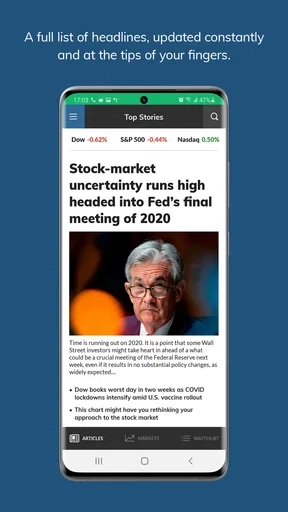
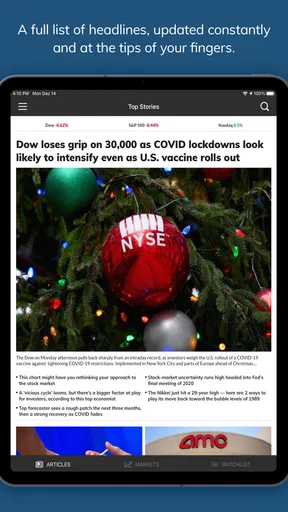
After a quick sign-up process, which you can bypass if you're just browsing, you're greeted with the home screen filled with the latest financial news headlines. There's something satisfying about having all the top stories right at your fingertips.
Features That Stand Out
Now, let’s talk features. The app offers a range of options that cater to both the seasoned investor and the finance newbie.
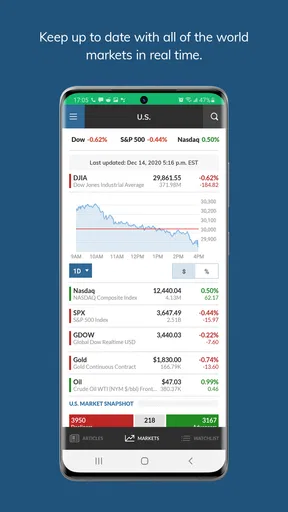
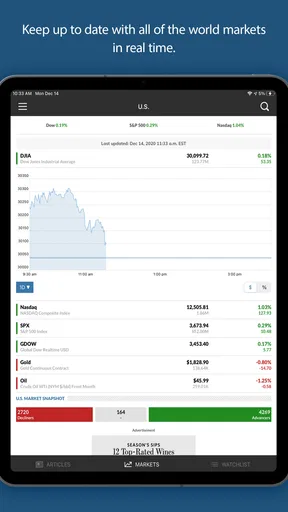
- Real-Time Market Data: This is a game-changer. The app provides live market data which is crucial for anyone making real-time decisions.
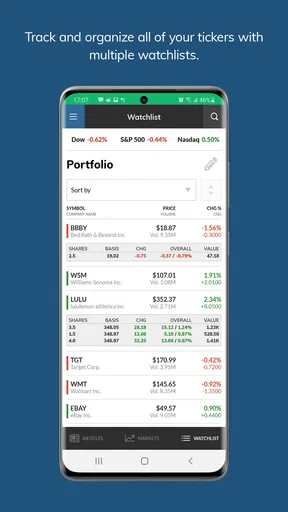
- Customizable Watchlists: You can tailor these to track specific stocks, mutual funds, or ETFs that matter to you. It's like creating your own little financial universe.
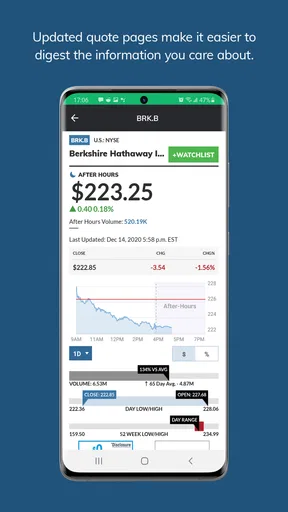
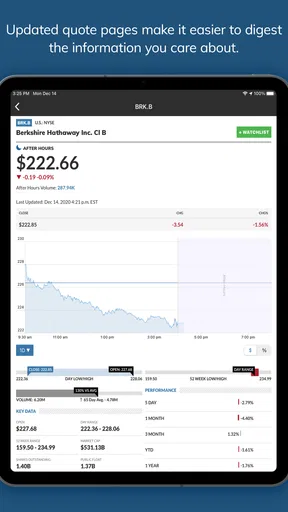
- In-Depth Analysis: If you're the kind of person who likes to dive deep into the numbers, the app offers detailed analysis and reports.
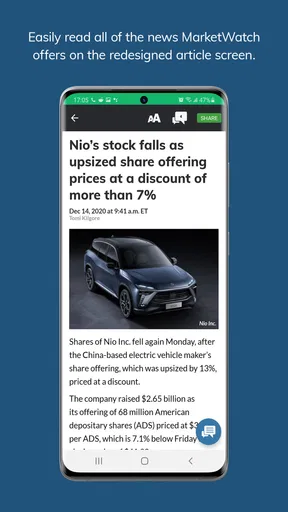
- Trending News: Stay updated with the latest buzz in the financial world, from stock movements to economic forecasts.
User Experience: Smooth Sailing
One thing I appreciate is how intuitive the app feels. Navigating through different sections is a breeze, and everything loads up pretty quickly. The app doesn’t bombard you with ads, which is a huge relief. Instead, it's more about getting you the information you need without any unnecessary distractions.
Notifications can be customized based on your interests. So, if you're keen on getting alerts about specific stocks or sectors, you can set it up to keep you informed without overwhelming you with info.
For a less noisy routine, I’d keep the watchlist focused on companies or funds I genuinely follow and use alerts sparingly. A broad list can turn routine checking into an endless stream of price changes, while a shorter one makes it easier to spot what deserves a closer look. I would also treat notifications as prompts to review context, not instructions to buy or sell; the timing of an alert does not tell me whether a move is meaningful for my own plans.
One everyday example: during a commute or a short break, I can scan the latest financial headlines, notice that a company I follow is in the news, and save the deeper reading for when I have time. That workflow is more useful than reacting on the spot. If the story concerns a longer-term holding, I’d check whether it changes the underlying picture rather than letting a single market session dictate my response.
The app is rated for Everyone 10+, and its current version is 7.9.23. Its average rating is 4.2 from around 50,000 ratings, with about 11,000 written reviews and over one million installs. Those figures suggest that it has reached a substantial audience, but I wouldn’t use popularity as a substitute for deciding whether its coverage and tools suit my habits.
Limits worth keeping in mind
Market information can create a feeling of immediacy that is not always helpful. Even when data is current, the app’s role is to inform, not to tell me what action to take. Market coverage can also be more compelling during volatile periods, when there are many headlines to follow; that is precisely when I’d be careful not to confuse frequent updates with better decision-making.
Another practical consideration is screen time. A feed and watchlist make it easy to check again and again, but most people do not need to monitor every fluctuation throughout the day. I’d set a deliberate routine—perhaps a quick morning scan and a more careful review when a relevant story appears—rather than leave alerts running for every name on a long list. This keeps the app useful without letting it dominate attention.
MarketWatch was released on August 13, 2013, and supports devices running Android 8.0 or later. That is helpful to know if you are checking compatibility before installing. The app is free to download, but purchases are priced individually in the $19.99–$22.99 range, so I would confirm which option is relevant to me before paying rather than assuming the purchase covers every possible use.
For people deciding between MarketWatch and a broker’s built-in news feed, the choice comes down to purpose. If I am already in a brokerage app to place an order, its integrated information may be enough for a quick glance. If I want to browse financial reporting separately from the act of trading, MarketWatch is the more natural fit. And if my priority is a specific portfolio calculation or personalized planning, I’d look for a tool focused on that job instead of expecting a news app to provide it.
Is It Worth It?
So, after spending some quality time with MarketWatch, would I recommend it? Absolutely. It's a powerful tool for anyone involved in the markets or just interested in financial news. The app is comprehensive but not complicated, which is a delicate balance to strike.
Whether you're a novice investor looking to learn or a seasoned trader needing the latest data, MarketWatch has something to offer. Plus, the fact that it’s free to use with optional premium features means you can get started without any commitment.
So, if you haven’t already, give MarketWatch a try. It might just become your new best friend in the world of finance!
My recommendation comes with one qualification: I’d install it for the reporting and regular market awareness, then judge its value by whether I actually return to it for useful context. The free starting point makes that trial straightforward, while the paid items are worth considering only if their specific benefits match a routine I already have. I would skip paying simply because I follow markets, and I would skip the app altogether if I wanted a transaction-focused tool or a personalized financial plan.
For me, the best use is a measured one: check what changed, read enough to understand the story, and then close the app until there is a real reason to return. Used that way, MarketWatch is a practical companion for staying informed. Used as a constant ticker or as a signal to make snap investments, it is much less convincing. If that distinction fits how you want to follow finance, it is worth trying; if not, a narrower or more specialized alternative will serve you better.
Verdict
Strengths of MarketWatch
- Comprehensive financial news coverage.
- User-friendly interface for easy navigation.
- Real-time stock market updates.
- Customizable watchlists and alerts.
- In-depth analysis and expert opinions.
Limitations of MarketWatch
- Ads can be intrusive at times.
- Limited offline content access.
- Requires account for full features.
- Occasional loading delays.
- No dark mode option available.
Other Releases by Dow Jones & Company, Inc.
View All
The Wall Street Journal. News
News & Magazines4.2

Investor's Business Daily
Finance4.4

Barron's: Investing Insights
News & Magazines3.1

MarketSurge
Finance4.2
Similar Picks in This Category
View All
Google Wallet
Google LLC4.3

Airtel: Recharge, Bank & Loans
Airtel4.0

PayPal - Pay, Send, Save
PayPal Mobile4.2

DANA Indonesia Digital Wallet
PT Espay Debit Indonesia Koe4.5

Binance: Buy Bitcoin & Crypto
Binance Inc.4.8

Cash App
Block, Inc.4.7
Frequently Asked Questions
What is MarketWatch and what features does it offer?
MarketWatch is a comprehensive financial app that provides real-time market data, news, and analysis for stocks, commodities, and currencies. Users can customize their watchlists, receive market alerts, and access expert insights to make informed investment decisions. The app also offers a user-friendly interface and personalized content based on user preferences.
Is MarketWatch free to use, or does it have a subscription model?
MarketWatch offers both free and subscription-based services. The free version provides access to essential market data and news, while the premium subscription, MarketWatch Premium, offers enhanced features like exclusive analysis, in-depth reports, and ad-free browsing. Users can choose based on their financial information needs.
How reliable is the news and data provided by MarketWatch?
MarketWatch is known for its credible and timely financial news, sourced from experienced journalists and financial experts. The app ensures accuracy by cross-referencing data from multiple reliable sources. However, users should also verify information through additional sources before making significant financial decisions.
Can I customize notifications and alerts in MarketWatch?
Yes, MarketWatch allows users to customize notifications and alerts to stay updated on market changes. Users can set alerts for specific stocks, market indices, or economic events. This feature helps users to react promptly to market movements and make informed decisions based on the latest data.
What are the technical requirements for installing MarketWatch on my device?
MarketWatch is available for both Android and iOS platforms. For Android, it requires version 5.0 and up, while iOS users need version 12.0 or later. The app is optimized for both smartphones and tablets, ensuring a seamless experience across various devices. Ensure your device meets these requirements for optimal performance.
